Listing a cat
What a listing has to say, its 60 days, kittens and parents, waitlists, reservations, Found a home, and when a listing locks.
How to list a cat
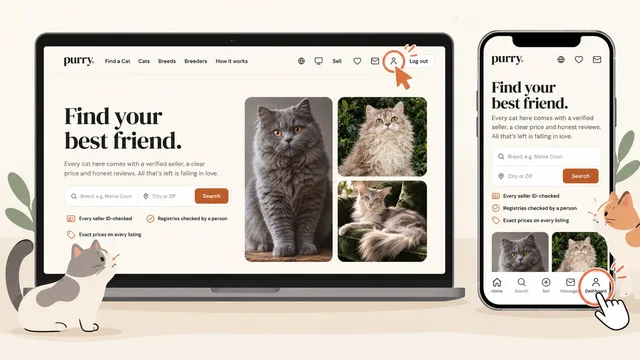
1. Open your dashboard
Sign in and press the person icon at the top right of any page, or Dashboard in the bar at the bottom on a phone.
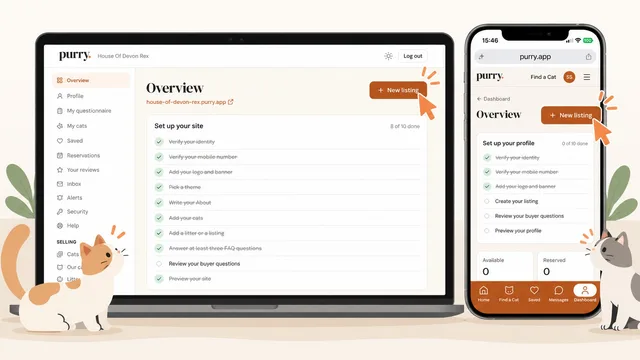
2. Press New listing
On your dashboard's Overview, press New listing.
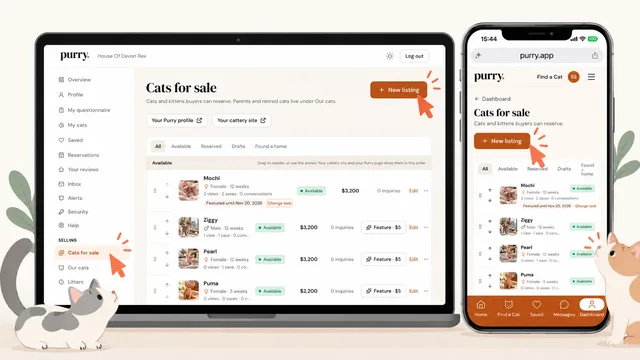
3. Or start from Cats for sale
Cats for sale, under Selling, lists every cat you have up and has its own New listing button. Your listings live here once they are saved.
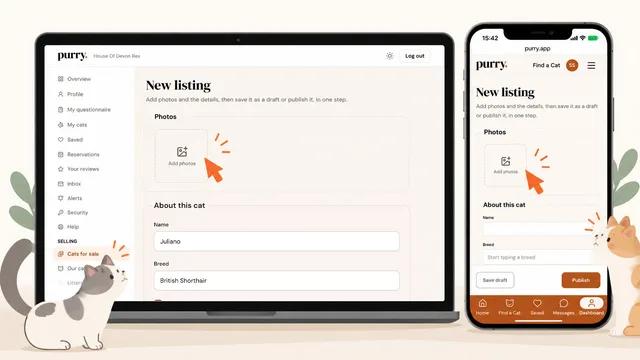
4. Add photos and the details
Press Add photos and choose your own photos of this cat, then fill in About this cat and the cards under it, from the price to how the cat gets home.
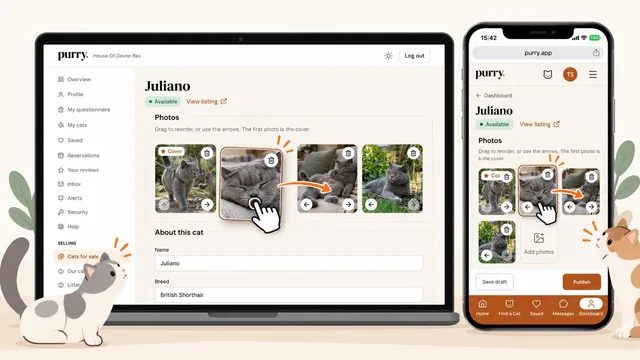
5. Put the photos in order
Drag a photo, or use its arrows, to change the order: the first photo is the cover buyers see first. The trash icon removes one.
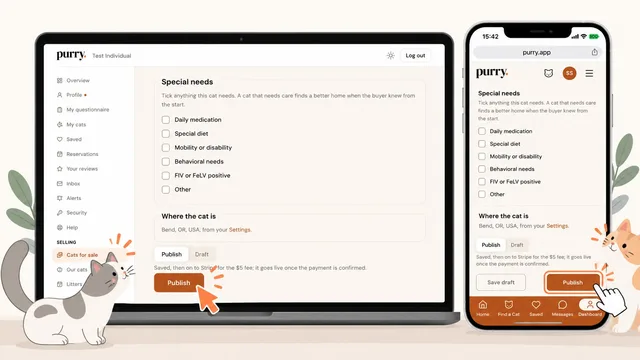
6. Publish
At the bottom, press Publish: Stripe opens for the $5 listing fee (your first listing is free until January 13, 2027), and the cat goes live once the payment is confirmed and your ID check has passed. Save draft keeps it to finish later, and if anything is missing, the line above the buttons says what.
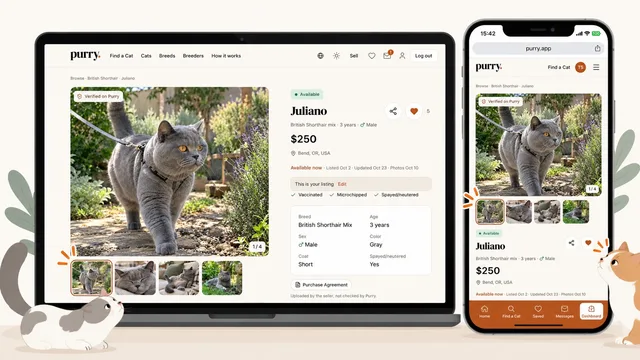
7. See your listing
Your cat's page is live, as buyers see it. This is your listing, with Edit, takes you back to the editor any time.
Feature your cat
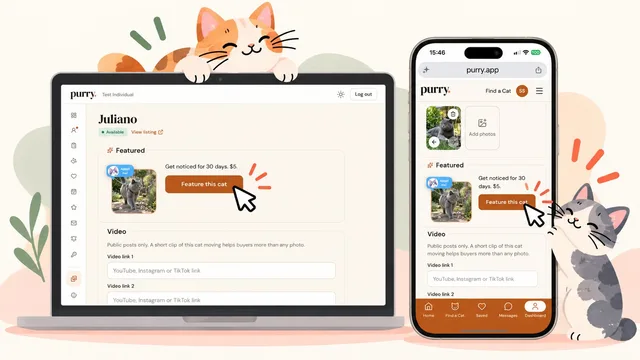
1. Find Feature this cat
Open an available cat's editor and press Feature this cat on its Featured card, or Feature · $5 on its row in Cats for sale.
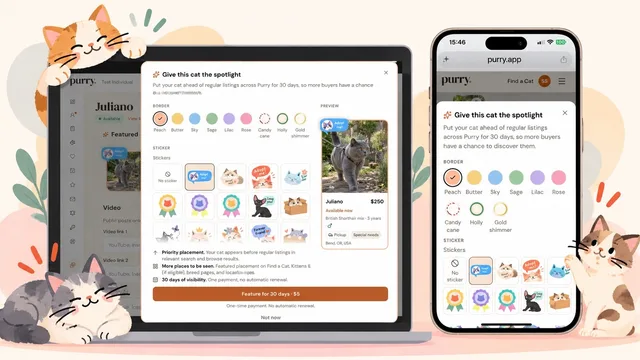
2. Make it yours, then pay $5
Pick a border, one of six colors or a seasonal ring, and a sticker; the preview shows the card as buyers will see it. Press Feature for 30 days · $5 to pay once through Stripe, with no automatic renewal.
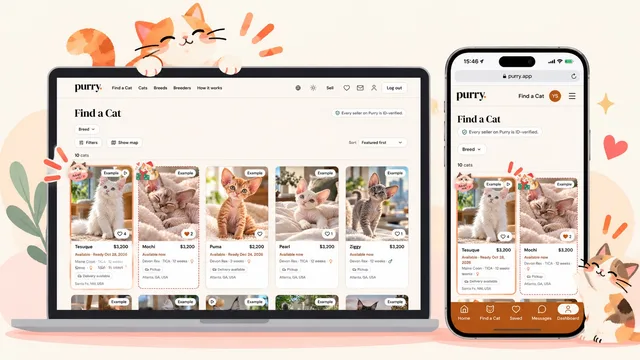
3. First on Find a Cat
For 30 days your cat comes first, in its border and sticker, on Find a Cat, Kittens, Free, breed pages and location pages while buyers keep the default sort, Featured first. Feature as many of your cats as you like, each its own $5.
What a listing has to say
An exact price, or Free to a good home. The Individual cap is 1,000 US dollars, 1,400 Canadian dollars, 950 euros, 800 pounds or 150,000 yen. Prices are in your country's currency, set by Purry from your country; a buyer who uses another currency sees your price with an estimate in theirs. Not a range, not "contact for price", not "price on request". A buyer comparing four cats cannot compare a number with an invitation to negotiate, and hiding the price is the single most common thing buyers complain about elsewhere.
Beyond that: your own photographs, the cat's date of birth, sex, color, how the cat gets home, and honest answers on litter training and whether the cat has met children, dogs or other cats. "Not sure" is an available answer and a better one than a guess: the filters treat it as unknown rather than as a no. The description has a small toolbar for bold, italic, headings, lists and links, up to 4,000 characters, and you can add up to two video links (YouTube, Instagram or TikTok) and up to five documents (vet records, say), which buyers see marked as uploaded by you and not checked by Purry.
Health, vaccination and other claims have to be true. That is in the seller agreement because it is the line that matters most.
New listing
New listing is one step: add the photos and the details, then press Publish, or Save draft beside it to finish later. Publishing takes you to Stripe for the $5 fee, or uses your free first listing, and the listing goes live once the payment is confirmed. On a live cat the same two buttons read Unpublish, which withdraws it, and Save changes. If anything a live listing needs is missing (how the cat gets home, say), it is saved as a draft and its page says what is left. Photos are not required: a cat with none shows Photos coming soon to buyers until you add some, and in search it comes after the cats with photos.
Until your ID check and your mobile number have passed, a published listing says Waiting for ID check and is not public; it goes live by itself once they pass. Getting verified has the steps.
A date of birth you are not sure of. Check Approximate under the date and pick a month and year under Born around. Buyers read "About 3 years" and "Born around March 2024", and age filters use the middle of that month.
Breed. Most rehomed cats are a Domestic Shorthair, Domestic Longhair or Domestic Medium Hair, each a breed of its own on Purry. For a cat with no known breed, check the mix box and choose Mixed breed, first in the list. For a breed that is not on the list, choose Other and type its name: the cat shows it everywhere, and a name search finds it.
Hybrid breeds. A Bengal, Bengal Longhair, Savannah or Chausie needs its Generation (F1 to F5, F6 and later, or SBT, which means at least four generations from the wild ancestor) before it can go live. Its listing tells buyers to check the law where they live, and under the generation you can add Places I will not sell to, shown to buyers on the listing and in the conversation. See Hybrid cats and the law.
Free to a good home
Check Free to a good home under the price and the listing shows as Free. The cat goes home by pickup or by meeting partway, and the buyer pays nothing: no fee, no transport cost and no deposit. Your $5 listing fee still applies. The listing tells buyers that anyone asking for money should be reported.
One cat per listing
A listing is always one cat: one price, one set of photos, one sale, one review. List as many cats as you like, each its own listing.
Papers, registration and parents
Everything a breeder can say about a cat, you can too, and all of it is optional. Registration papers asks which of four comes with the cat: a registration certificate or pedigree, a registration application or breeder slip, paperwork provided later, or none. With a certificate, add the Registry and the cat's Registration number, up to three. Color, Pattern and Eyes are picked from swatches, with the registry's color name under them if the papers give one. What's included lists what goes home with the cat, and Special needs what a buyer should know.
Parents records the cat's mother and father: a cat already on Purry, by the link to its page, or typed in by hand with its own parents if you know them. Buyers see them on the listing and in the family tree, marked as reported by the seller.
Kittens
If your cat has had kittens, list each one as its own $5 listing; they can all be up at once. Litter pages and expected litters, with their litter waitlists, are part of the Breeder plan; you can still keep a waitlist on a single cat (see Waitlists below).
How long a listing runs
A listing runs 60 days on its fee, counted from the day you first publish it. When they are up it shows Expired; Relist for $5 puts it back up for another 60.
Cats for sale
Your Cats for sale tab lists every listing with its status: Available, Waiting for ID check, Pending, Reserved, Withdrawn, Expired, Draft, Found a home or Came back. Each row shows its views, saves and conversations, and its ... menu has View listing, Withdraw or Relist, Mark reserved, Mark found a home and Delete; what does not apply is grayed out with the reason. On the All tab you set the order your cats show in on your Purry profile, by dragging or with the arrows.
Changing who the cat is
Until somebody holds the cat, everything on a listing is editable. A change to the cat's name, breed, sex or date of birth is posted as a note in every conversation about the listing, so nobody is surprised by it.
This stops a listing being edited into a different cat, which is how a seller elsewhere keeps one listing's reviews and photos while quietly selling a new animal under them. Create a new listing for each cat.
Reservations, from your side
A buyer asking to reserve writes to you. That is all it does: your listing does not move, nothing is frozen, and no clock starts. Before they can ask, they answer your own questions, if you have any.
You decide. From the conversation's header you can Reserve for that buyer, and later Mark found a home; from Selling > Reservations you can mark a reserved cat Found a home or put it Back to available, and the buyer is emailed when you do that last one. You may note a date you are holding until; we remind you on the day and change nothing ourselves.
Take no money until the buyer has met the cat in person. You can take payment through Purry at the meeting, or arrange it directly. That is the rule buyers are told for Individual sellers, and the listing's safety note says so. Through Purry, once you have connected your own Stripe account on Getting paid, Reserve for offers Full payment: the buyer is asked to pay when they meet the cat, and the payment is processed through your own Stripe account. There is no deposit for an Individual seller. A payment made to you outside Purry you record with Mark paid, and the buyer is asked to confirm it. Getting paid on Purry has the rest.
The sale agreement
You can put a sale agreement on file in Selling > Agreement, and the buyer you reserve a cat for reads and signs it on Purry. Use Purry's template, where every blank is a field with a label and a preview shows the finished agreement as you type, or upload your own PDF of up to 10 MB. The cat's own details (its name, breed, sex, date of birth, price and go-home date) come from its listing when the buyer signs. The template asks for no deposit, since you take none.
Choose when the buyer signs. At reservation, before any payment is the default: when you reserve the cat for a buyer, or ask them for the full price through Purry, they are asked to sign first, and their Pay button waits until they have. At pickup: once the cat is reserved, the conversation shows Send the agreement to sign, to press when you meet. Marking a cat Found a home never waits for a signature.
The buyer cannot edit the agreement; if they want a change, they write to you. Once they sign, you both get the signed PDF by email, and the conversation and Selling > Reservations show Agreement signed with the date.
Purry is not a party to the agreement. It provides the template and keeps the signed copy for both of you. You are responsible for what the agreement says and for making sure it meets the law where you and the buyer live.
Waitlists
For a cat that is already spoken for, you can keep a line of buyers who have written to you about it, in case it falls through. Add them from the Waitlist card in the cat's editor, which shows once somebody has asked or is waiting. You set the order, you can reorder or remove anybody, and they see where they are in the line. A waitlist place locks the listing the same way a reservation does: the name, breed, sex, date of birth and terms cannot change while anyone is waiting.
Editing a reserved cat
Once a cat is reserved for somebody, or anybody holds a place on its waitlist, what they agreed to stays put until every reservation and place has ended: who the cat is (its name, breed, sex and date of birth) and the terms (the price, spay or neuter, any health guarantee, and how it gets home). Those fields are grayed out on the listing and the database refuses them too.
Everything else stays yours to update: the description, the ready date, vaccinations and the traits. You can add photos and reorder them, but not remove or replace them. Every change is recorded with what it was before and what it is now, and the buyer sees them at the top of the listing and in your conversation, under Updated since you reserved. Everybody else sees only "Updated" and the date.
If the reservation ends and the cat is reserved for somebody else, the next buyer sees only the changes made while it was reserved for them.
Once a cat has found a home
Mark it Found a home and say which buyer, chosen from the people who have messaged you about it. It takes one click and it is what lets that buyer leave a review with the Verified buyer chip on it. They are offered to add the cat to their own My cats, and to be shown as its owner.
The listing then locks. It is the record of a cat that has gone, and the review under it is about that cat. You can still edit the description, name the buyer if you marked it without one, and add photos; a photo added after the sale can be removed again, the ones from before cannot.
A seller who never marks a cat Found a home ends up with no verified reviews, but not with no reviews. A buyer can tell you from your conversation that the cat is home with them, once you reserved it for them or once it left Available after they wrote; confirm it and that is the same as marking it Found a home for them, and if you neither confirm nor dispute it within seven days they can review you anyway, without the chip.
Cat came back. If a cat returns to you, Cat came back keeps the sale and its review and tells the buyer in your conversation. The buyer is asked to confirm it, and the cat leaves their My cats and their profile at once. The listing stays locked; Relist this cat makes a new draft of the same cat, with its photos, once the buyer has confirmed the return or seven days have passed. Until then the row says Return awaiting the buyer's confirmation with the date. If the buyer says it is not right, if it is the second return of the same cat, or if you had another return in the last 90 days, Purry looks first: the row says Purry is reviewing this before it can be relisted. Once relisted, the listing says how many times the cat came back. The buyer can still review the sale, and a review stays: marking a cat returned never removes one.
Notes about buyers
Once a sale is confirmed, you can leave one private note about the buyer, from your conversation with them, under the Found a home note: Would you sell to them again? Yes, No or Not sure, and up to 500 characters. A sale is confirmed when you marked the cat Found a home for them and they confirmed it (their review, the cat added to their My cats, or their own "is home with me") or seven days have passed, or when they told you the cat is home with them and you confirmed it or did not dispute it in seven days. You can edit your note at any time.
The buyer never sees it, and nor does the public. Only other sellers that buyer messages read it, beside their conversation with them, under the buyer's questionnaire, each note with its answer (Would sell to them again, Would not sell to them again, or Not sure), the seller's name, the cat and the date. When two or more different sellers would not sell to the buyer again, the notes start with "2 sellers would not sell to them again", and a person at Purry looks at that buyer's notes. Nothing is blocked. Above the notes, Purry shows its own record: each cat the buyer took home on Purry, with the seller and the month, and "Returned" with the month where a return was confirmed. You see the same for every buyer who messages you.
Message {seller} under another seller's note opens a message to them about that buyer. The conversation between the two of you starts when you send it, and is then listed under Conversations with sellers on your Inquiries page. The buyer never sees it.
Keep a note honest and about the sale. The buyer can ask Purry to review the notes about them, and Purry removes a note that is untrue, unfair or breaks the rules; a removed note cannot be written again.
Withdrawing and deleting
Withdraw asks why: Found a home elsewhere marks it Found a home with nobody named, and Taking a break makes it Withdrawn. Withdrawing does not pause the 60 days: Relist is free inside them, and Relist for $5 after.
Delete takes a draft away at once, and a published or withdrawn listing after you confirm; its fee is not refunded. It is not possible once a listing has a conversation, a reservation, a waitlist place or a review, or has found a home: withdraw it instead.
Who sees your listings
In Settings, under your web address, Site visibility is Public (the default) or Unlisted. Unlisted, your Purry profile and listings open only for people who have the link: they are left out of Find a Cat, breed pages, the home page and search engines. Your dashboard says Unlisted at the top while it is on.
Your profile, name, place and links come from your Profile page, and your listings show your city and state, never your address.
Alerts
Every breed page carries an email alert for buyers waiting on that breed. When you publish a cat, everyone waiting for its breed, and for that breed in your state, hears about it in the next morning's email. Members who saved you as a seller see it in their Alerts.
Hidden pending review
Anyone can report a photo on Purry, on a listing, if they believe it is theirs or that it does not show your cat. A person at Purry reads every report. If it looks right, we hide the photo while we review it: it disappears from Purry, its link stops working, and we email you to say which photo and why. We never tell you who reported it.
In your dashboard the photo stays where it was, marked Hidden pending review, and nothing else about the listing changes. If the photo is yours, or you have the right to use it, press Ask for it back on that tag and say why in a sentence or two: it goes to the person reviewing the report, the tag changes to Review requested, and you can ask once for each hidden photo. You can also replace it with one of your own. A formal copyright notice or counter-notice goes through our Copyright page.