Getting verified
Your card, your ID and your mobile number, then the optional registry check that gives your cattery the Registry Checked chip.
Nothing of yours is public until you are verified. That is the point of the badge: a buyer who sees Verified on Purry knows a person's identity was checked before a single cat went up.
Every seller verifies their ID. Breeders can also have their registry checked for the Registry Checked chip.
Nobody approves your account and there is no application to wait on. Choose the Breeder plan on Sell, give your name, your cattery's name and where you are, pick monthly or yearly, and agree to the Seller Agreement. Three steps are then left before anything of yours is public, and the go-live card on your dashboard takes you through them in order: your card, your ID and your mobile number.
Your card
The plan form goes straight to Stripe to add a card. It starts your subscription without charging it: Stripe's page shows $0.00 due today, your free month starts, and the card is charged on day 31. We email you 3 days before that happens, with the amount and the date, and links to update the card or cancel. If you left Stripe's page before finishing, the card step on your go-live card opens it again. What it costs has the prices.
Verify your identity
Every seller on Purry verifies their identity, so buyers know who they are talking to.
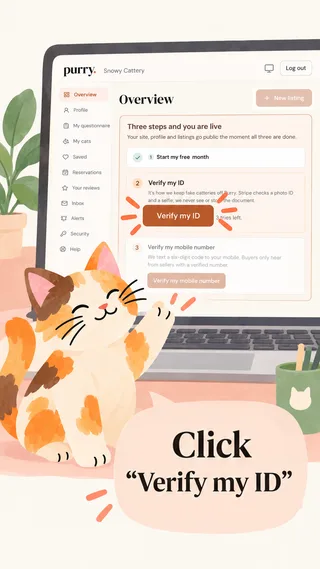
1. Click Verify my ID
On your dashboard, click Verify my ID to get started.
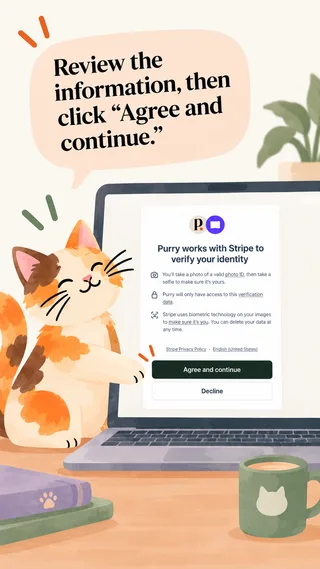
2. Agree and continue
Purry uses Stripe to verify your identity securely. Review the information, then click Agree and continue.
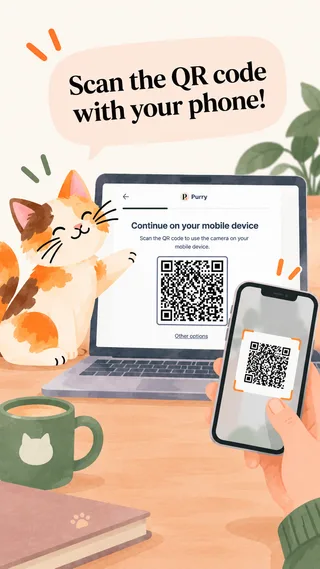
3. Continue on your phone
On a computer, scan the QR code with your phone.
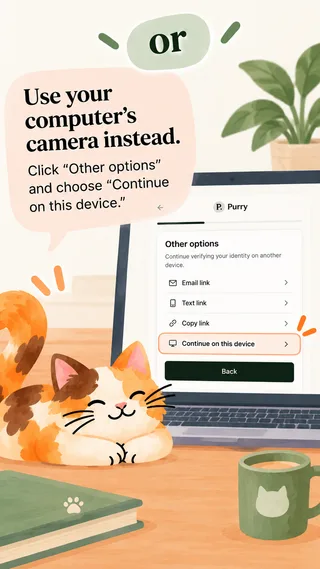
4. Or use your computer's camera
Click Other options and choose Continue on this device.
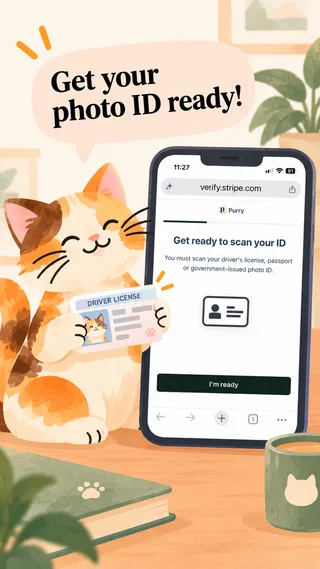
5. Get your ID ready
Have your government-issued photo ID ready, tap I'm ready and allow camera access.
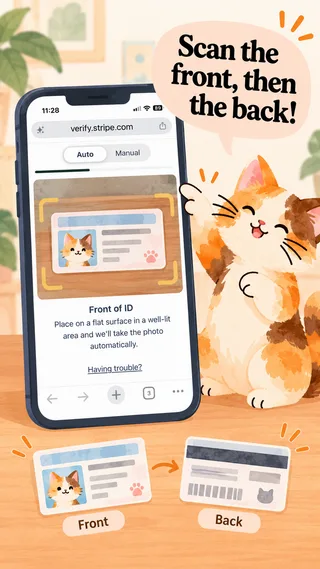
6. Scan your ID
Place it on a flat surface in good light. Stripe captures it automatically, or switch to Manual. Scan both sides if asked.
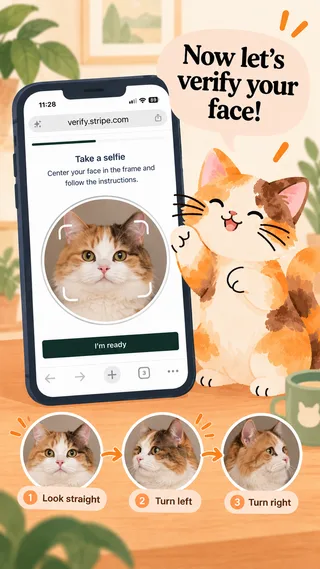
7. Face verification
Look straight ahead, then turn left and right as instructed.
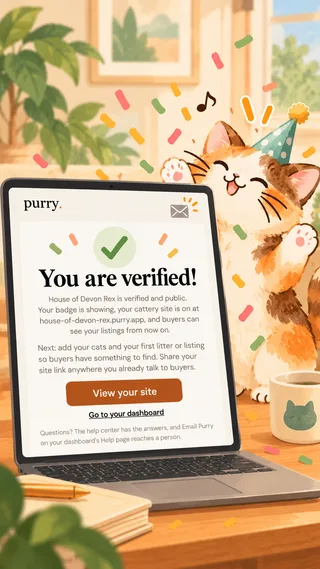
8. You're verified!
You get a confirmation email from Purry. If anything needs another look, we contact you.
It confirms you are who you say you are, which makes fake accounts much harder. Stripe checks a photo ID and a selfie; we never see or store the document. All we keep is that the check happened and the name it verified.
Your verified name is compared with Your name, the first and last name you gave when you chose the plan. Use your own name as it is on your ID: buyers see your cattery's name, not yours. If the two do not match, a person at Purry looks rather than turning you down. Once the check passes, the name on your Profile is your Verified name; to change it, use Request a change there and a person at Purry updates it.
While Stripe is checking, your dashboard says Stripe is checking it now. If Stripe cannot verify your document or your selfie, the dashboard says why and you try again. You have three tries, and a try counts only once you submit your ID to Stripe; after the third, a person at Purry looks at it. If you start the check and leave before finishing (pressing Back on Stripe's page, say), your dashboard offers Continue verifying my ID, where you left off, or Start over with a fresh check; neither uses a try. A check left unfinished for a day is cleared, and you start it again from the dashboard.
Your mobile number
Verify your mobile number is on your dashboard's setup list, after Verify your identity, and it is the third step on your go-live card. We text a code to a mobile number from a phone carrier. VoIP numbers (Google Voice among them), landlines and toll-free numbers are refused, and no code is sent to them.
One phone, one verified account: a number already verified on another Purry account cannot be verified on yours. The number is never shown to buyers. You also need it to reply to buyers; if you have not verified it yet, the reply box asks for it and sends your reply once you have.
When all three are done, we email you You are verified on Purry. Your listings can go live, your cattery site at yourname.purry.app turns on, and your listings, profile and site carry the Verified on Purry badge.
Listings go live in the United States, Canada, the United Kingdom, Japan and Europe, each in its own currency: US dollars, Canadian dollars, pounds, yen or euros, set by your country. Breeder plan sellers anywhere else can subscribe, be verified and set up their profile and site now; listings open in your country once prices can be shown in your currency, and until then you can write them as drafts.
Your registries
Optional, and you can add them any time: on your dashboard, Profile, then Your registries. Add each registry you belong to with Add registry: the registry, your cattery or registration name exactly as the registry lists it, and the number if it gives one. Each shows whether it is Checked by Purry (with the date) or Not checked. The registries offered depend on your country:
- United States and Canada: TICA, CFA, ACFA or CCA-AFC.
- United Kingdom: GCCF, TICA or CFA.
- France: LOOF, FIFe (through your national member club, which you name), TICA or CFA.
- Rest of Europe, Russia, Ukraine and Turkey: FIFe, through your national member club (you name the club), WCF, TICA or CFA.
- Australia: ANCATS, CCCA, your state cat council (you name it), TICA or CFA.
- New Zealand: NZCF, TICA or CFA.
- Japan: JCC (Japan Cat Club), TICA or CFA.
- Anywhere else: TICA or CFA.
US and Canada: Which Cat Registry Should You Join? compares TICA, CFA, ACFA and CCA-AFC.
Everywhere else: Cat Registries Around the World explains each one.
Everywhere, the last choice is Other registry, with its name: a person checks it by hand like any other.
Somebody at Purry checks each registration by hand, not on an honor system. If your cattery is listed on the registry's public breeder search we can check it there. Otherwise add your registration certificate or breeder slip (a photo or a PDF, up to 2 files, 10 MB each) when you add or edit the registry, so a person can confirm it. Only Purry's reviewers can open the files, they are never public, and they are deleted 90 days after we decide. If the number does not resolve to the cattery name you gave, or the owner name does not match the name on your ID, we say what did not match rather than guessing. Expect a business day or two, and you get an email either way.
The Registry Checked chip
When a registry passes, the Registry Checked chip (its note names the registry, like "Purry found this cattery in TICA's records") shows on your profile, your site and your listings, beside Verified on Purry, from the moment your ID check has passed too. Your listings can then include registration papers. Without a checked registry they read "Registration papers: Not available", and nothing else waits for it: your account, site and listings go live without the chip.
Changing or removing a registry
A registry that is Not checked you edit or delete on the card, and the page's Save keeps it; a changed one waits for a person to check it again.
A registry Checked by Purry cannot be edited or deleted directly, because a person at Purry checked it. Edit opens Request a change: the new details and a short note saying why. Delete opens Request removal, with a note. A person at Purry looks at the request and approves it (a change is then checked by Purry from that day; a removal takes the registry off) or declines it (nothing changes), and we email you either way. While a request is open the registry says Change requested or Removal requested, and it and your chip stay as they are. Removing your last checked registry takes the Registry Checked chip off everywhere at once.
If someone else claims your cattery
If a new seller gives a registry number or cattery name that matches one already on Purry, their registry check waits until a person has looked. If the match is your cattery, we email you and your dashboard's Overview shows it, with This is not me, dispute it and room for a short note if you do not know the seller; a person reads your note before deciding. Nothing about your site or listings changes.
If it is your own number that matched, going live is not held: only your registry check waits for that look.
Selling from Japan
If your business location on Settings is Japan, Japanese law asks a little more of a cat seller, and Purry asks for it before anything of yours is public. Your setup list shows Add your registration details until it is done.
Your registration. A breeder selling cats in Japan is a 第一種動物取扱業者, registered with their prefecture or city. On Settings, under Registration details (動物取扱業), give:
- 第一種動物取扱業 登録番号 (Registration number)
- 種別 (Business type), which is 販売 (sales)
- 登録年月日 (Registration date)
- 有効期間の末日 (Expiry date)
- 動物取扱責任者 (Responsible person)
- 登録自治体 (Registration authority)
- 事業所の名称及び所在地 (Facility name and address)
Why the address is public. The law requires a seller to show these details wherever they advertise, the facility's name and address included. So they appear on your Purry profile, your cattery site and every listing, under 動物取扱業者 登録情報, marked Provided by seller. There is no switch to hide the address. Purry shows what you give and does not check it against the registry.
Keeping it current. Thirty days before the expiry date you get an email and an Alert. Once the date has passed, your cattery site, your Purry profile and your listings are hidden from buyers until you save the new expiry date, and nothing can be published or relisted. Your listings keep their status and say Waiting for registration details; your preview shows your details marked Registration expired. Everything comes back by itself once you save the new date. The same happens if you change your business location to Japan without these details saved.
Each cat. Every listing asks Microchipped and registered (環境省), yes or no. Microchipped shows under What's included only for a yes.
The 56-day rule. Japanese law does not allow a kitten to go home before 56 days of age, so a listing's go-home date (or Ready now) can't be earlier than 56 days after the date of birth. An expected litter shows its earliest go-home date as 56 days after the due date.
Selling in person. Japanese law requires the sale to be completed in person at your registered premises. Every listing says so under Getting home.
Payments. Payments through Purry are not available in Japan. You can still record deposits and payments by hand in the conversation.
Selling from Europe
If your business location on Settings is in Europe, Purry follows a few rules for every cat, and in France and Scotland asks for your registration before anything of yours is public. Listings are not open in Russia or Belarus.
France. On Settings, under Registration details (Informations légales), give:
- Numéro SIREN (SIREN number), nine digits
- Numéro I-CAD (I-CAD number)
Your setup list shows Add your registration details until both are saved. They appear on your Purry profile, your cattery site and every listing, under Informations légales (Legal information) with your name, marked Provided by seller. Purry shows what you give and does not check it.
The United Kingdom. In Scotland, give your Animal breeding licence number and Licence expiry date under Registration details (Breeding licence); your setup list shows Add your registration details until they are saved. Elsewhere in the UK both are optional. Once a number is given, it appears on your profile, your site and every listing under Breeding licence, with your region as the licensing authority. In Scotland the expiry works as Japan's: an email and an Alert 30 days before the date, and once it has passed your site, profile and listings are hidden from buyers until you save the new date, marked Registration expired in your preview.
Germany. If you hold a permit under §11 of the Tierschutzgesetz, you can give its number under Registration details (Erlaubnis nach §11). It is optional, and shown under Erlaubnis nach §11 TierSchG (§11 permit) only when given.
Everywhere else in Europe you are asked nothing on Settings. Individuals are asked nothing anywhere in Europe.
Each cat. Every listing asks Microchipped and registered, yes or no. Microchipped shows under What's included only for a yes.
8 weeks. A kitten cannot go home before 8 weeks of age, so a listing's go-home date (or Ready now) can't be earlier than 56 days after the date of birth. An expected litter shows its earliest go-home date as 56 days after the due date.
Leaving the country. Every listing says under Getting home what a kitten needs to leave: from an EU country, an EU pet passport, a rabies vaccination and a health certificate; from the UK, Switzerland, Norway and the rest of Europe, a rabies vaccination and an animal health certificate. You arrange them.
Payments. Payments through Purry are not available in Europe. You can still record deposits and payments by hand in the conversation.
What verification is not
It is a check on identity, not a warranty on an animal. Where you add a registry, we confirm the cattery is registered where it says it is; we do not inspect it, and we do not test cats. Buyers are told this plainly, and they are told to meet the cat.
Losing it
We can withdraw verification if it turns out to have been obtained with false information, and we can suspend an account for mistreatment of animals, scam behavior or repeated buyer complaints. The seller agreement is the binding version of that sentence.